Imagine, your logo or signature made into a branding iron!
Wouldn't that add a real professional touch to your work? All we need is
a sharp, clean, black and white image and we can make that happen. Torch heated
or electric, up to 3 square inches for a hobbyist electric unit and 16 square
inches for a standard commercial duty electric unit. We can also make larger,
custom made logo irons. See guidelines below for creating the art for your logo
brander.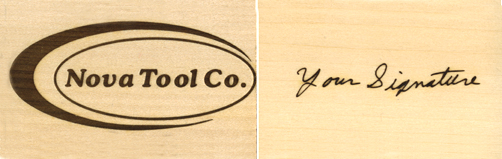 |
| Guidelines for creating your art on your computer or
scanning a paper image to transmitt by email: (click here for tips on
drawing your art on paper) The image should be clean, crisp, and black on a clean white backround.
|
|
Drawing your image on paper: Your image should be a clean, crisp, black image on a clean white backround.
|
| Things to
avoid: 1. Thin or very small, white areas surounded by heavy black areas: 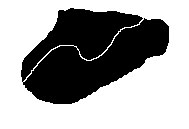 The thin white line will tend to burn over and disappear. 2. Skips of the pen when drawing art or signing your signature: 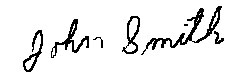 Many times these skips aren't noticed on the paper because your eye tends to "fill them in" but the process of making the iron will exagerate them and they will be more noticeable on the iron. 3. Lettering that is too small: Normally 10 point, which is a little less than 1/8 inch high, is the smallest that we recommend. In some applications a smaller size may work. 4. Lettering that is too bold: TOO BOLD The little openings in the letters O, B and D will burn shut. Please call us at 800-826-7606 if you have any questions regarding your art. |
| Go To Top of Page |
Call 800-826-7606
E-mail: will.aerni@novatoolco.com